Connect areas, groups, people and activities in shared workspaces
Organize your organization’s areas of activity, structure its working groups, and provide each participant with a shared space to access information, collaborate, share knowledge and follow their activity.
Working groups no longer need to depend on scattered emails, documents and conversations. Instead, they become a connected process linking members and professionals, the Technical Secretariat, content, activities and private workspaces.
Working groups need structure, access, communication and follow-up
Areas, committees and working groups bring people together around objectives, projects, documentation and shared activity. The Platform connects this journey while preserving the autonomy of each group.

Organize areas and groups
Structure groups within their corresponding areas and bring together their mission, leaders, documentation, publications and projects.

Manage access
Enable membership requests and allow the Technical Secretariat to validate and manage participants.
Enable collaboration
Provide forums, member directories, private communication and shared spaces for exchanging information and working together.
Coordinate and track
Bring meetings, tasks and activities together in shared agendas and provide administrative follow-up for groups and participants.
From organizational structure to collaboration and follow-up
The Platform connects the creation and organization of each group with participant onboarding, day-to-day activity and the operational view required by the Technical Secretariat.
From the group structure to each participant’s day-to-day work
Essenzial’s proven capabilities cover the main stages of the module with tangible evidence from the product.
Present each group within the organization’s structure
Each area can bring together different working groups and provide members and professionals with a clear view of the spaces in which they can participate.
- Related areas and groups.
- Visual group catalogue.
- Access to specific information.
- Related projects, publications and documentation.

Connect group information with participant onboarding
Within each group, people can learn about its mission, publications and projects and request membership through a form connected to the Technical Secretariat.
- Group information.
- Membership request.
- Participant data.
- Validation by the Technical Secretariat.

Provide a shared space for communication and collaboration
Participants can join discussions, start new topics and see who belongs to the group. Communication is no longer fragmented across external tools and isolated conversations.
- Discussion forums.
- Group-specific or shared discussions.
- Member directory.
- Private communication between participants.

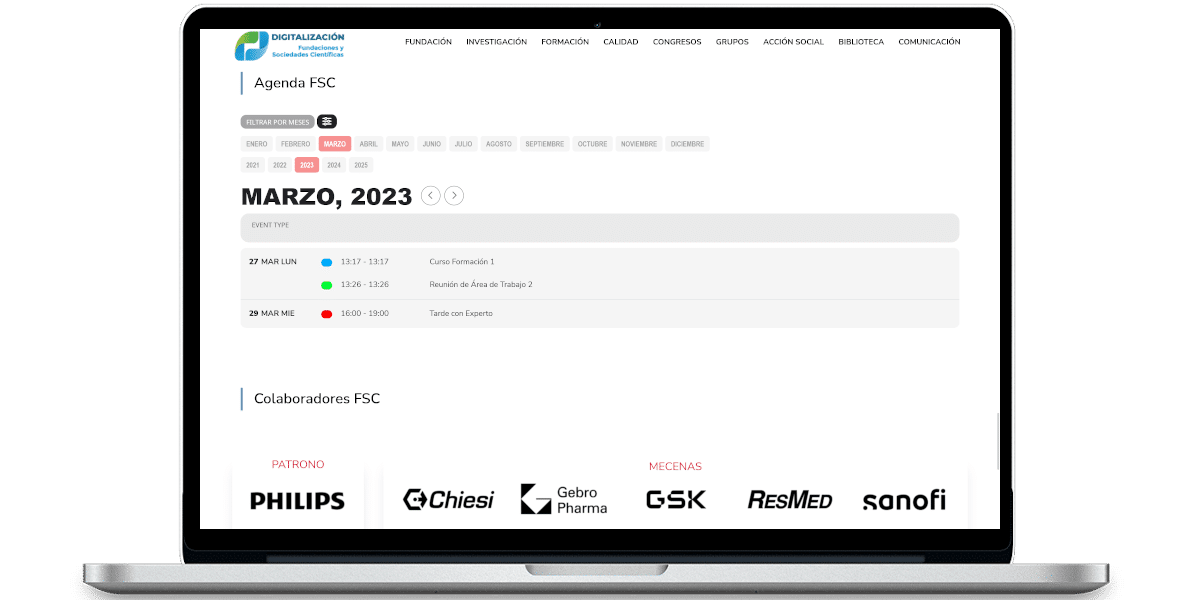
Bring meetings, tasks and activities together in a shared agenda
Groups can use calendars for meetings and other activities, providing a shared timeline and access to the relevant information for each item.
- Activity agenda.
- Meetings and meeting notices.
- Time-based filtering.
- Information related to each activity.
Give the Technical Secretariat an operational view of groups and participants
From the backend, the Technical Secretariat can view active groups, manage requests and participants, and track their activity and interactions.
- Overview of active groups.
- Participants and pending requests.
- Onboarding and administration.
- Activity and progress tracking.

Working groups connect people, knowledge, activity and services
A working area becomes more valuable when it shares identity, content, activity and administration with the rest of the Platform.
From collaborative spaces to more connected working processes
When groups, participants, content, meetings and activity share the same architecture, automation, data-driven capabilities and AI-assisted support can be applied to specific tasks.
Intelligence should support collaboration and reduce operational work, while keeping people responsible for content, decisions and the dynamics of each group.
Areas & Working Groups in about two minutes
A quick overview of the capabilities connecting structure, access, collaboration, agendas and group follow-up.
How do your areas and working groups operate today?
We can assess how you organize participation, collaboration and follow-up and identify which processes should be integrated, simplified or evolved.