One private experience for the entire relationship with your organization
Bring together in one personal space the services, activities, requests, documents, membership fees, transactions and conversations that each member or professional maintains with your organization.
The Member Portal moves beyond a private area with scattered links to become the unified experience where each person can understand their relationship, continue their processes and access what they need.
One person can have many relationships with the same organization
A member may also be a learner, conference attendee, working-group member, grant applicant, author, reviewer, speaker or member of a governing body. M10 brings those relationships together under one identity and one experience.

Access what matters to their profile
Show shortcuts, summaries and relevant content according to who the person is and the relationship they have with the organization.

Bring their services together
Courses, conferences, groups, projects, grants, publications and other services accessible from a single space.
Track their activity
Requests, registrations, statuses, calendar and history visible without having to locate each process in a different application.
Connect with the Secretariat
Enquiries, issues and tickets integrated with activity so every conversation retains its context and traceability.
The Member Portal is the Platform’s point of convergence
M10 does not recreate the processes for Training, Events, Research, Groups, Members or Administration. It makes them accessible from the person’s perspective and maintains their continuity within one private space.
One private experience
From “my private area” to a configurable personal experience
Essenzial’s roadmap organizes the Portal around five areas that make sense to the user: personalized access, services, activity and support, documentation and profile.
Start with what each person needs now
The dashboard can be configured with shortcuts, summaries, alerts and specific content according to the user’s profile and the processes they participate in.
- Member, learner, speaker, researcher, sponsor or other profiles.
- Shortcuts to active services.
- Activity summary and outstanding items.
- An experience adapted to each person’s context.

Access every service you participate in from one place
The Portal brings together access to specialized modules without requiring the user to understand the Platform’s internal architecture.
- Courses and Virtual Campus.
- Conferences, events and sessions.
- Areas and working groups.
- Projects, grants and calls.
- Publications and other services.
Know what you have requested, what is pending and what requires your attention
Calendar, requests, registrations and activity history can coexist with enquiries and issues opened with the Technical Secretariat.
- Personal calendar.
- Requests and registrations.
- Statuses and next steps.
- Activity history.
- Tickets and communication with the Technical Secretariat.

Bring together the documents generated throughout the relationship
Certificates, diplomas, credentials, supporting documents and other files no longer need to be scattered across applications and processes; they are available from the personal space.
- Training and attendance certificates.
- Diplomas and credentials.
- Supporting documents and process documentation.
- Download from the private area.

Give users control over their data and a traceable channel with the Secretariat
The personal space brings together the data describing the person’s relationship with the organization and keeps support from the Secretariat accessible through traceable enquiries and issues.
- Personal data and preferences.
- Account management.
- Payment methods.
- Membership fees and subscriptions.
- Orders and service documentation.
- Enquiries and issues with the Technical Secretariat.
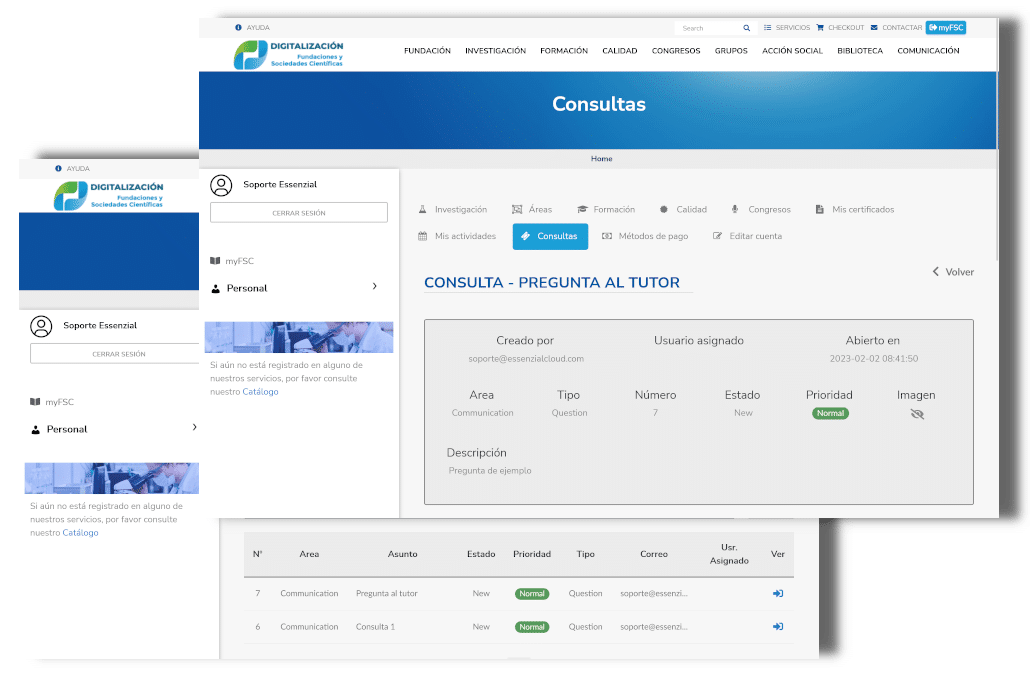
What starts outside continues inside
M01 enables people to discover and start services. Specialized modules and the Secretariat manage them. M10 gives the person access to status, documentation, pending actions and outcomes.
The Member Portal makes the integration of the Platform visible
Its value does not come from accumulating standalone features, but from presenting the user with a coherent relationship built from data and processes that live across different modules.
From displaying information to helping each person understand what they need to do
By bringing together identity, activity, statuses, documentation and services, the Portal can evolve into an experience that prioritizes information, anticipates next steps and reduces the need to search through menus and applications.
AI should assist with information and processes governed by the organization: guiding, summarizing and facilitating access, not deciding rights, administrative statuses or outcomes that depend on institutional rules.
The Member Portal already exists; now it is evolving into the single point for the private relationship
Essenzial’s existing solution already provides access to courses, events, working areas, projects, certificates, orders, enquiries, issues and activities. The current roadmap reorganizes those capabilities into a configurable personal experience and connects them with profile, membership fees, subscriptions and documentation.
This evolution does not start from a product hypothesis: it combines capabilities already deployed with the User Portal approach defined for the Platform’s upcoming implementations.

Member Portal
The original video shows the functional foundation of the private area on which the new unified user experience is evolving.
What does a member see today when they want to know everything that is pending with their organization?
We can assess your current private experience and identify how to bring services, activity, documentation, membership fees, requests and support together in a Member Portal connected to the rest of the Platform.